
Table of Contents
TL;DR
DTF is a framework that codifies infrastructure pivot techniques that could help cyber threat researchers.
Tactical Pause
THE CONTENT, VIEWS, AND OPINIONS EXPRESSED ON THIS DOCUMENT ARE MY OWN AND DO NOT REFLECT THOSE OF MY EMPLOYER OR ANY AFFILIATED ORGANIZATIONS. ALL RESEARCH, ANALYSIS, AND WRITING ARE CONDUCTED ON MY PERSONAL TIME AND USING MY OWN PERSONALLY-ACQUIRED RESOURCES. ANY REFERENCES, TOOLS, OR SOFTWARE MENTIONED HERE ARE LIKEWISE USED INDEPENDENTLY AND ARE NOT ASSOCIATED WITH, ENDORSED, OR FUNDED BY MY EMPLOYER.
Background
This is just a quick post about something I started working on earlier this year. I posted it to a GitHub repo (https://github.com/MalasadaTech/defenders-threatmesh-framework), but I didn’t blog about it. If you don’t blog about something, it never happened, so here it is – it happened. If you’re in a rush, you should start reading from the “DTF Matrix” section.
Problem
When I first started learning about thractor (threat actor) thracking (threat tracking), or simply ththracking (threat-actor threat tracking, pronounced as “th-th-racking” sort of as if you have a lisp and you are discreetly laughing at a friend’s joke to acknowledge their joke while ensuring you don’t disturb others that are in close proximity but are not involved in the conversation), my notes were getting very messy with pivot techniques, I was having issues with remembering the pivots techniques I’d learned, and it was becoming cumbersome to discuss the pivot techniques.
Messy notes
The notes were supposed to be for fake updates or fake apps thresearch (threat research) or whatever I was looking into at that time. The notes were messy because I wasn’t just keeping notes on whatever I was thresearching- I was keeping notes on the pivots I was learning. It got to a point that I needed to keep pivot notes in a separate tracker. I wanted a simple way to keep the pivot techniques as a footer in my notes.
Forgetting pivot techniques
I found myself going back into old thresearch notes to refresh my memory on a pivot. There were a handful of times that I re-learned pivots. I noticed I was wasting time poking around exploring only to end up using pivots that I should’ve remembered and checked in a more methodical manner.
Communicating pivot techniques
I noticed that it took an extra effort to discuss some pivot techniques in person. I thought it would be cool to have a framework that could document pivot techniques and codify them. The codified pivot techniques, in addition to examples, simplified communicating the pivots.
Solution
DTF is the solution to my issues. By codifying the pivots, I no longer have messy or excessive notes because I can simply save the pivot code/values in a section at the end of my notes. By creating the matrix that lists all of the pivot techniques, I was able to check for pivots quicker and more methodically. By using the codified pivot techniques and combining them with the pivot values, I’m able to communicate the pivots per thresearch topic more simply.
DTF Matrix
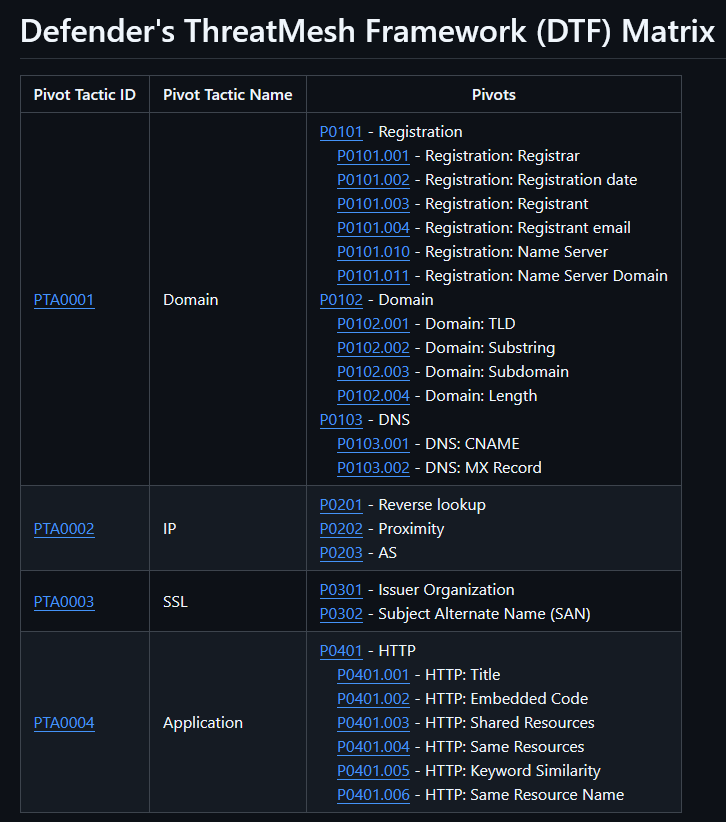
The DTF matrix is a simple table that shows the pivots grouped by the pivot tactic and ID. The tactics right now are Domain, IP, SSL, and Application. I made it in markdown format, and I put it on GitHub. This could be ideal for folks that use the Obsidian notes app (https://obsidian.md/). You could just download the repo, open it in Obsidian, and tag it up with your own notes. From the matrix, you can click into the tactics or the specific techniques, or just use it as a reference as you search for thrinfrastructure (threat-actor infrastructure) pivots. It is my hopes that DTF will help my fellow cyber thresearchers, thrunters (threat hunters), thranalysts (threat analysts), and thrintelligence (threat intelligence).
https://github.com/MalasadaTech/defenders-threatmesh-framework/blob/main/matrix.md

Pivot techniques
Each technique includes a brief description, a blurb for any example, general instructions, and links to related examples.
https://github.com/MalasadaTech/defenders-threatmesh-framework/blob/main/pivots/P0101.001.md

Examples
Each example includes a description that states the who and what, a link to the example source, a list of pivot techniques codified the way I record them in my thresearch notes, and links to the pivot technique pages.
https://github.com/MalasadaTech/defenders-threatmesh-framework/blob/main/examples/EX0001.md

Summary
The Defenders ThreatMesh Framework (DTF) simplifies my thresearch efforts. I hope it helps you.
with planny aloha
mahalo for your time
[…] Backend C2 Analysis Defender’s ThreatMesh Framework (DTF) – An Infrastructure Pivot Framework TA569 SocGholish Overlap w/TA582 Infra Copy/Paste Technique Used to Deliver XWORM PDF Lure […]