
TL;DR
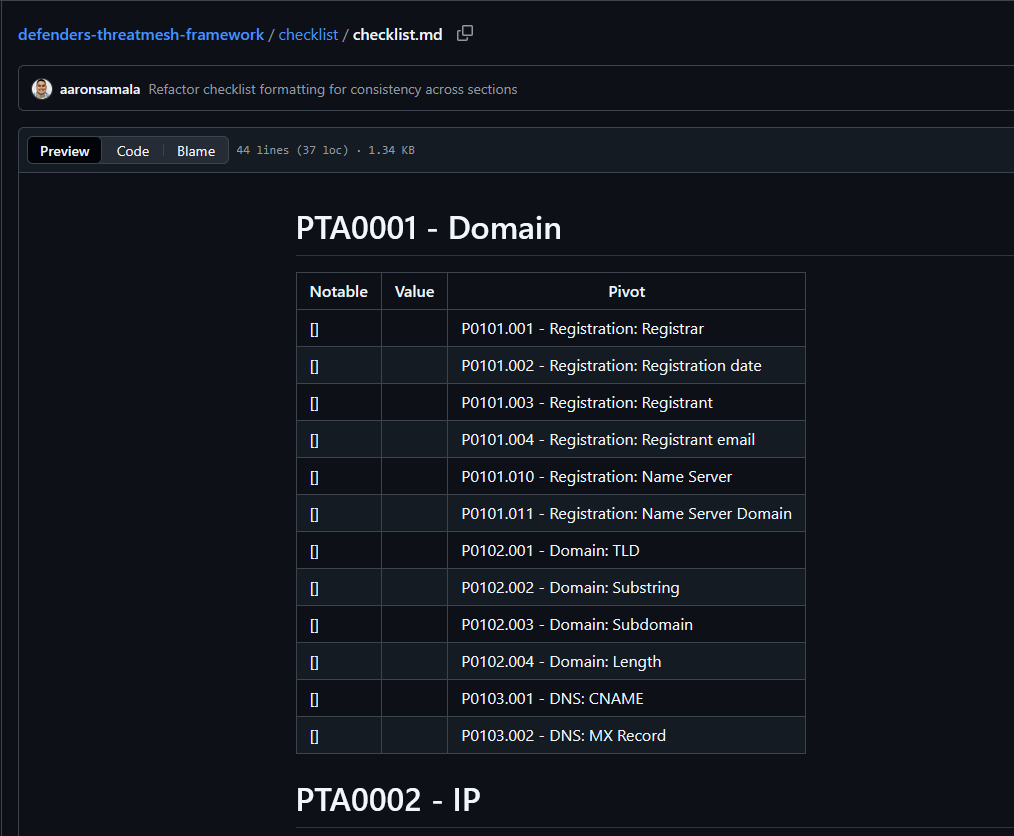
This is a checklist that thruntellisearch analysts can use in their quest to uncover additional adversary infrastructure. It may help provide a structured analysis.
Table of Contents
Tactical Pause
THE CONTENT, VIEWS, AND OPINIONS EXPRESSED ON THIS DOCUMENT ARE MY OWN AND DO NOT REFLECT THOSE OF MY EMPLOYER OR ANY AFFILIATED ORGANIZATIONS. ALL RESEARCH, ANALYSIS, AND WRITING ARE CONDUCTED ON MY PERSONAL TIME AND USING MY OWN PERSONALLY-ACQUIRED RESOURCES. ANY REFERENCES, TOOLS, OR SOFTWARE MENTIONED HERE ARE LIKEWISE USED INDEPENDENTLY AND ARE NOT ASSOCIATED WITH, ENDORSED, OR FUNDED BY MY EMPLOYER.
Intro
Defender’s ThreatMesh Framework (DTF) documents pivots that thruntellisearch analysts can use to uncover additional infrastructure [1]. This consolidated checklist provides a structured approach to pivoting from seed indicators (e.g., a known malicious domain) across all pivot tactics (PTAs) [2]. Start with PTA0001 for domain-based indicators, then check IP, SSL/TLS, and application pivots. Combine multiple pivots (e.g., registrar + ASN + name server) for higher-fidelity clusters, and document hits for hIGMA export [3].
Validators
As you work through the pivots, take note of validation techniques (“validators”). Validators are methods to confirm a match. For example, it’s possible to reveal additional domains used in a given campaign based on the registrar, ASN, and name server combination. With each additional domain you uncover, how can you validate it? How can you increase your likelihood? If the campaign uses a specific page title accross domains, you can use that as a validator.
Common Pivots
Take note of any common pivots or pivot combinations. I notice that a common pivot combination for domains are P0101.001 (Registration: Registrar), P0101.010 (Registration: Name Server), and P0203 (AS). For websites, my common go-tos are (P0401.001 HTTP: Title), P0401.004 (HTTP: Same Resources), P0401.006 (HTTP: Same Resource Name).
Usage
Clone/copy/download the checklist markdown file [2]. Load it in Obsidian or any MD viewer, or convert it to whatever. You can fill it in as you work, or just use it as a visual reference.
PTA0001 – Domain
- Take note of the domain characteristics (e.g., registration, structure, DNS). Analyze if they reveal coordinated campaigns (e.g., bulk registrations, shared DNS) and if they can be combined with IP, SSL, or HTTP pivots to identify the thractor infrastructure.
P0101 – Registration
- Take note of the registration properties. Analyze if there are any properties that can be used in combination with other properties to identify the thractor infrastructure.
P0101.001 – Registration: Registrar
- Take note of the registrar. Analyze if it can be used in combination with other properties to identify the thractor infrastructure.
P0101.002 – Registration: Registration date
- Take note of the registration date. Analyze if it can be used in combination with other properties to identify the thractor infrastructure.
P0101.003 – Registration: Registrant
- Take note of the registrant. Analyze if it is a unique value that isn’t private.
P0101.004 – Registration: Registrant email
- Take note of the registrant email. Analyze if it is a unique value that isn’t private.
P0101.010 – Registration: Name Server
- Take note of the name server. Analyze if it can be used in combination with other properties to identify the thractor infrastructure.
P0101.011 – Registration: Name Server Domain
- Take note of the name server domain. This is more useful for name servers that use a fourth-level subdomain. Analyze if it can be used in combination with other properties to identify the thractor infrastructure.
P0102 – Domain
- Take note of the domain name characteristics (e.g., structure, patterns, length). Analyze if they reveal campaign-specific naming conventions, such as typosquatting or bulk generation, and if they can be combined with registration or DNS pivots for broader infrastructure discovery.
P0102.001 – Domain: TLD
- Take note of the top-level domain (TLD). Analyze if the TLD is uncommon or campaign-specific (e.g., .top for phishing) and if it can be combined with other properties like registrar or ASN to narrow thractor clusters.
P0102.002 – Domain: Substring
- Take note of substrings, prefixes, or suffixes in the domain name. Analyze patterns using regex (e.g., for typosquatting or thematic lures like “willo”) and if they can be combined with DNS records or HTTP artifacts to identify related domains.
P0102.003 – Domain: Subdomain
- Take note of any subdomains. Analyze if they indicate shared hosting or aliasing (e.g., “google” in phishing) and if they can be combined with SSL SAN or reverse lookups for subdomain enumeration.
P0102.004 – Domain: Length
- Take note of the domain length (e.g., exact character count before TLD). Analyze if short lengths suggest DGA-generated domains and if they can be combined with creation dates or resource hashes to filter bulk registrations.
P0103 – DNS
- Take note of DNS resolution artifacts. Analyze if they point to shared infrastructure (e.g., canonical targets) and if they can be combined with domain patterns or IP pivots to trace email or redirect chains in campaigns.
P0103.001 – DNS: CNAME
- Take note of the CNAME record. Analyze if it resolves to a shared canonical domain (e.g., bmtrck[.]com variants) and if it can be combined with HTTP resources or ASNs to uncover redirect-based infrastructure.
P0103.002 – DNS: MX Record
- Take note of the MX record. Analyze if it indicates shared email services (e.g., improvmx[.]com) and if it can be combined with substring patterns or registrant details to detect phishing kits.
PTA0002 – IP
- Take note of the IP resolution from the seed domain. Analyze if it indicates dedicated hosting or compromises and if it can be combined with domain, SSL, or HTTP pivots to map thractor networks.
P0201 – Reverse lookup
- Take note of the IP address resolved from the seed domain. Analyze if it can be used in combination with other properties to identify the thractor infrastructure.
- Check for any other domains that resolve to that IP (e.g., via tools like Silent Push or Validin). Analyze if the IP is unique to the thractor or shared across benign/malicious clusters, indicating dedicated vs. compromised hosting.
P0202 – Proximity
- Take note of the IP address resolved from the seed domain. Analyze nearby IPs (e.g., sequential or subnet-adjacent) for shared hosting patterns and if they can be combined with other properties like ASNs or domain patterns to identify the thractor infrastructure.
P0203 – AS
- Take note of the Autonomous System (AS) number or name for the IP resolved from the seed domain. Analyze if it can be used in combination with other properties to identify the thractor infrastructure.
PTA0003 – SSL/TLS
- Take note of the SSL/TLS certificate details from the seed domain. Analyze for enumeration opportunities and if they can be combined with domain, IP, or HTTP pivots to uncover hidden assets.
P0301 – Issuer Organization
- Take note of the SSL certificate issuer organization (e.g., Let’s Encrypt). Analyze if it is a common free CA used by thractors and if it can be combined with other properties like ASNs, HTTP titles, or domain TLDs to identify the thractor infrastructure.
P0302 – Subject Alternate Name (SAN)
- Take note of the Subject Alternate Name (SAN) entries in the SSL certificate. Analyze if they enumerate hidden subdomains or related hosts (e.g., via crt.sh queries) and if they can be combined with other properties like domain subdomains or DNS CNAMEs to expand thractor infrastructure discovery.
PTA0004 – Application
- Take note of the HTTP artifacts from the seed domain (e.g., titles, embedded code, resources, response codes). Analyze if they indicate shared phishing kits, malware templates, or campaign lures and if they can be combined with other properties like domain substrings, ASNs, or SSL issuers to identify the thractor infrastructure.
P0401 – HTTP
- Take note of the HTTP artifacts from the seed domain (e.g., titles, embedded code, resources, response codes). Analyze if they indicate shared phishing kits, malware templates, or campaign lures and if they can be combined with other properties like domain substrings, ASNs, or SSL issuers to identify the thractor infrastructure.
P0401.001 – HTTP: Title
- Take note of the page title (e.g., “Download” or “AVG 2024 | GRATIS Antivirus”). Analyze if it is a common lure for masquerading campaigns and if it can be combined with other properties like resource hashes or TLDs to identify the thractor infrastructure.
P0401.002 – HTTP: Embedded Code
- Take note of embedded code snippets (e.g., JavaScript strings like “getIPAddres”). Analyze if they reveal kit reuse or unique actor fingerprints and if they can be combined with other properties like keyword similarity or response codes to identify the thractor infrastructure.
P0401.003 – HTTP: Shared Resources
- Take note of shared resources hosted at the same external source (e.g., image/script hashes like 5f3ec643731be3a71b0845e6d398a07ea21dc3c6d0298150470b3b4a1942cf89). Analyze if they point to centralized asset distribution and if they can be combined with other properties like domain length or CNAMEs to identify the thractor infrastructure.
P0401.004 – HTTP: Same Resources
- Take note of identical resources (e.g., favicon or CSS hashes like 1b9efb22c938500971aac2b2130a475fa23684dd69e43103894968df83145b8a) hosted across different sources. Analyze if they indicate kit propagation and if they can be combined with other properties like ASNs or embedded code to identify the thractor infrastructure.
P0401.005 – HTTP: Keyword Similarity
- Take note of keyword patterns in page content (e.g., “free cheats” or “game hacks”). Analyze if they match thematic lures (e.g., via YouTube-linked mediafire URLs) and if they can be combined with other properties like titles or subdomains to identify the thractor infrastructure.
P0401.006 – HTTP: Same Resource Name
- Take note of resource filenames (e.g., misspelled “refrence.html” or “ads.php”). Analyze if they suggest copy-paste kits or backend C2 patterns and if they can be combined with other properties like response codes or ASNs to identify the thractor infrastructure.
P0401.007 – HTTP: Response Code
- Take note of the HTTP response code (e.g., 200 for active endpoints) for unique routes (e.g. /ads.php). Analyze if it refines queries for live infrastructure (e.g., backend C2) and if it can be combined with other properties like resource names or hashes to identify the thractor infrastructure.
References
1 – https://malasada.tech/defenders-threatmesh-framework-dtf-an-infrastructure-pivot-framework/
2 – https://github.com/MalasadaTech/defenders-threatmesh-framework/blob/main/checklist/checklist.md
3 – https://github.com/MalasadaTech/hIGMA
With planny aloha, mahalo for your time