
Table of Contents
TL;DR
Oyster malware delivery via MS Teams Fake App.
Tactical Pause
THE CONTENT, VIEWS, AND OPINIONS EXPRESSED ON THIS DOCUMENT ARE MY OWN AND DO NOT REFLECT THOSE OF MY EMPLOYER OR ANY AFFILIATED ORGANIZATIONS. ALL RESEARCH, ANALYSIS, AND WRITING ARE CONDUCTED ON MY PERSONAL TIME AND USING MY OWN PERSONALLY-ACQUIRED RESOURCES. ANY REFERENCES, TOOLS, OR SOFTWARE MENTIONED HERE ARE LIKEWISE USED INDEPENDENTLY AND ARE NOT ASSOCIATED WITH, ENDORSED, OR FUNDED BY MY EMPLOYER.
Intro
Oyster malware is being delivered via an MS Teams Fake App. This will not cover what Oyster malware is, or its history. This will cover the delivery, and it will cover some of the execution indicators. The intended audience for this is Thruntellisearch analysts – that is threat hunt/intelligence/research analysts. This will include links to hIGMA and SIGMA rules to hunt internally and externally.
Initial Lead
The initial lead for this was a post by David Kasabji (@roo7cause) on X [1]. The Conscia link has more details [2].

Delivery
I used the teams-install[.]icu indicator that David provided. urlscan has a scan task available for analysis [3].

The main transaction to look for is the download-script.js. Note: sometimes the filename has numbers after “download-script”.

The response shows the value we want is stored in the apiUrls variable [4]. The snip below shows the apiUrls value and the checkUrlAvailability function. I observed the apiUrls domain provides a decoy response if the OPTIONS method and the application/json Content-Type header isn’t set.

The next part will request the /create/link route. It will check if the apiUrls domain is available. When it is available, it will create a POST request with the “msteams” Content-Encoding header added. When it receives the download URL, it will add it as an anchor to the DOM, it will click the anchor, and then it will remove the link from the DOM.

I found a similar MS Teams Masq site (teams-install[.]top) and ran it in Any Run [5]. The urlApi variable was eastridge-infotech[.]com. Here are the transactions below.
First there’s the OPTIONS request to the /create/link route with the application/json Content-Type header. There were two of them. The first one is below.

Next is the POST request shown below. It shows the route to download the malware is “/gov/e59b6d89b90dd6dbbe3aa3ac163eea3d659e952bac6a6bf65b99e40157cb95f5”.

The snip below shows the request for the malware from the downloadUrl. The filename is “MSTeamsSetup.exe”.

Execution
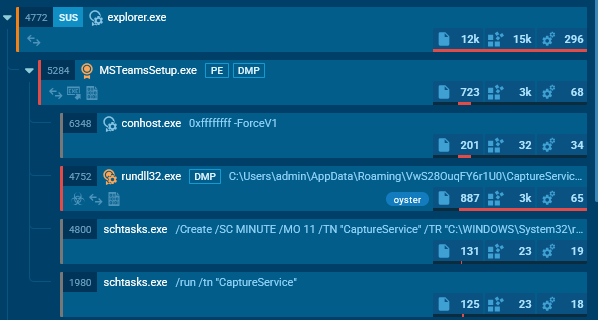
Any Run flags it as “oyster”. It creates the scheduled task “CaptureService”.

Beacon
Any Run shows MSTeamsSetup.exe connects to nickbush24[.]com.

The first request is a GET request to the /reg route using “WordPressAgent” as the User-Agent value. The response body is success.

The second request is a GET request to the /login route using “FingerPrint” as the User-Agent value. The response is some kind of encoded or encrypted value.

The scheduled task was to run rundll32.exe. Any Run shows rundll32.exe communicate with techwisenetwork[.]com.

It first makes a GET request to the /api/kcehc route. The response is just curly brackets.

It next makes a POST request to the /api/kcehc route with content in the request body. The response is some kind of encoded or encrypted response.

Finally, there are multiple POST requests to the /api/jgfnsfnuefcnegfnehjbfncejfh route. The request and response appear to have encoded or encrypted content in the body.

Summary
Oyster malware is being delivered via MS Teams Fake App.
Indicators
teams-download[.]buzz
teams-download[.]icu
teams-download[.]top
teams-install[.]icu
teams-install[.]top
teams-install[.]run
eastridge-infotech[.]com
witherspoon-law[.]com
techwisenetwork[.]com
datadrivendreamers[.]com
cybersavvynetwork[.]com
daringdatadaredevils[.]com
funkyfirmware[.]com
185.28.119[.]228
51.222.96[.]108
51.222.96[.]69
135.125.241[.]45
85.239.53[.]66
Pivots
The following pivots are written in hIGMA [https://github.com/MalasadaTech/hIGMA/tree/main].
Pivot on the title to find the masq pages:
https://github.com/MalasadaTech/hIGMA/blob/main/rules/fake-msteams-to-deliver-oyster.yaml
Pivot on the domain registration and hosting info to find the delivery domains (apiUrls).
https://github.com/MalasadaTech/hIGMA/blob/main/rules/fake-msteams-installer-delivery-domains.yaml
Pivot on the response hash to find Oyster Malware C2:
https://github.com/MalasadaTech/hIGMA/blob/main/rules/oyster-malware-c2-via-response-hash.yaml
Detections
The SIGMA rules to detect these activities are listed here: https://github.com/MalasadaTech/sigma/tree/main/rules/20250928-oyster-malware-delivered-via-teams-fakeapp.
References
1 - https://x.com/roo7cause/status/1971453273862176887
2 - https://conscia.com/blog/from-seo-poisoning-to-malware-deployment-malvertising-campaign-uncovered/
3 - https://urlscan.io/result/0199811b-9f6b-7783-a214-978680e2ab76/
4 - https://urlscan.io/responses/291973f004fcaa78e053a33a99b2bb0b09cb80d9e972aa26d0b5715c75eef64a/
5 - https://app.any.run/tasks/6d3e33b3-bfcc-4084-9d6a-70b0e594d43e
with planny aloha mahalo for your time
[…] thoughts on improving analysis and reporting Thruntellisearch Analyst’s Pivot Checklist Oyster Malware Delivery via Teams Fake App Malformed Rhadamanthys DoH Query FOLLOW ME ON X […]
[…] Teams Transcript Page Lure Delivers GoTo RMM PoisonSeed YouTube-themed Career Phishing BLOG: My thoughts on improving analysis and reporting Thruntellisearch Analyst’s Pivot Checklist Oyster Malware Delivery via Teams Fake App […]